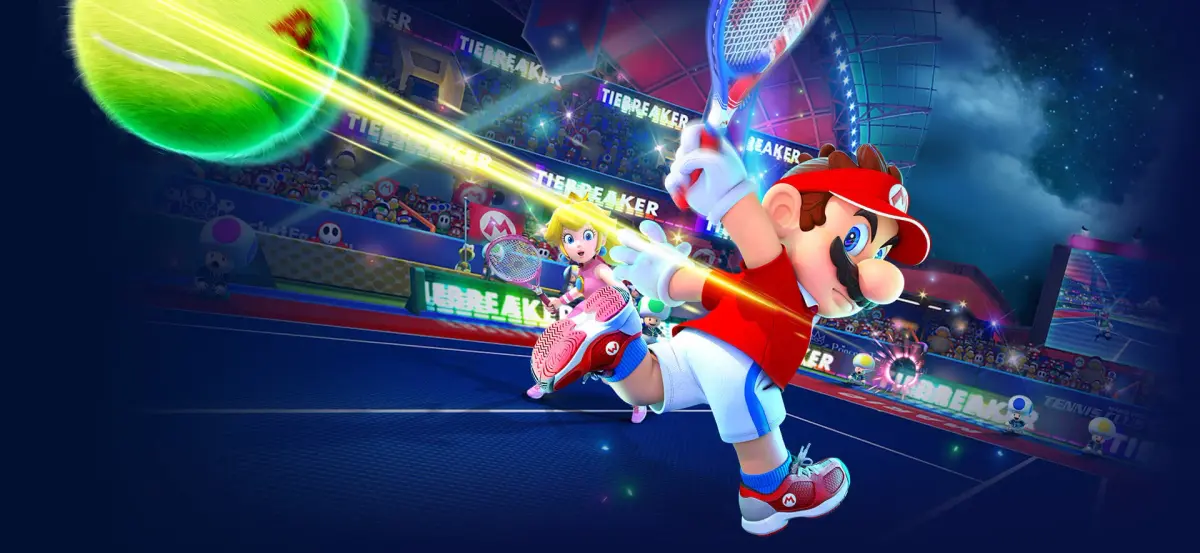
Mario Tennis Aces throws you into a vibrant world of high-stakes tennis, blending classic Mario characters with a surprisingly deep set of mechanics. It’s not just about hitting the ball; you’ll be mastering zone shots, special shots, and even using energy to unleash devastating abilities. Whether you’re playing solo in the adventure mode or taking on friends, the game offers a fun, accessible, yet challenging tennis experience for everyone.
This guide is your go-to resource for conquering every aspect of Mario Tennis Aces. We’ll walk you through mastering the controls, navigating the challenging Adventure Mode, and tackling tough bosses like the Swamp Beast and the Infernal Tangle. Plus, we'll help you achieve those coveted Gold Medals on every mission and uncover all the secrets hidden across the game's many courts.
Tournament Mode
Master Mario Tennis Aces Tournament Mode, including Online and COM tournaments. Learn about Standard and Simple Class rules, participation bonuses, and COM Cup unlocks.
Before diving into Tournament Mode in Mario Tennis Aces, ensure you are comfortable with the game's fundamentals, including identifying shot types, countering Zone Shots and Special Shots, and understanding each character's strengths and weaknesses.
Tournament Mode offers two main options: Online Tournament and COM Tournament.
Online Tournament
To participate in an Online Tournament, you must agree to share information such as your Nintendo Account nickname, country, and other statistics. You can then choose between Standard Class or Simple Class tournaments.
Standard Class Tournaments
Standard Class tournaments in Mario Tennis Aces allow the use of energy-based skills. The rules are as follows:
- Matches are two-game, one-set matches.
- Each player is given two rackets. Losing both rackets results in a knock-out.
- Points towards rankings are earned by winning the match or by winning via KO.
Simple Class Tournaments
Simple Class tournaments in Mario Tennis Aces do not use energy-based skills, relying purely on your mastery of the five basic shot types. The rules are:
- Matches are two-game, one-set matches.
- Points are earned by winning the match.
In both Standard and Simple Class online tournaments, you must win five matches to win the tournament. Each character can compete, and winning a tournament with a character earns them a crown on their title card. Rankings are separate for each class. Simply playing at least one match in an online tournament grants a participation bonus character. If you do not play for a given month, the bonus character becomes available to everyone at the start of the next month. For July 2018, the participation reward was Koopa Troopa.
Rankings can be viewed under the Rankings tab, showing points, win-loss ratio, and player rating. You can switch between World, National, and Friend rankings. Points are awarded based on playtime and tournament progression, with bonus points for advancing:
- Round 1 Bonus: +25 points
- Round 2 Bonus: +50 points
- Quarterfinals Bonus: +100 points
- Semifinals Bonus: +200 points
- Finals Bonus: +500 points
COM Tournament
For those who prefer to play against computer-controlled opponents, COM Tournaments are available in Mario Tennis Aces. There are three cups to earn, each representing a difficulty level: Mushroom Cup (easy), Flower Cup (medium), and Star Cup (hard). To play the Flower Cup, you must have won at least one tournament with a character in the Mushroom Cup. To play the Star Cup, you must have won at least one tournament with a character in the Flower Cup. Each playable character can earn each cup, indicated by a crown on their title card.
Before starting a COM Tournament, you can toggle control settings like gyroscopic controls, left/right and up/down inversion, and right joystick controls by pressing . You can also switch the character's play hand by pressing , which swaps the Topspin Shot and Flat Shot buttons while leaving Slice Shot and Lob/Drop Shot the same.
Opponents in the tournament bracket are randomized. Match rules vary by cup difficulty:
- Mushroom Cup: Match 1 (2-game, 1-set), Match 2 (2-game, 1-set), Finals (2-game, 3-set). 6 rackets.
- Flower Cup: Match 1 (2-game, 1-set), Match 2 (2-game, 3-set), Finals (2-game, 3-set). 7 rackets.
- Star Cup: Match 1 (2-game, 1-set), Match 2 (2-game, 3-set), Finals (2-game, 5-set). 8 rackets.
Gameplay and Controls
Learn the fundamentals of Mario Tennis Aces, including game rules, scoring, basic shots like topspin, slice, and flat, and how to serve effectively to dominate your opponents.
Success in Mario Tennis Aces relies on your knowledge of core fundamentals of the game. From the basic shot types to new game mechanics, you're sure to find useful information in this section.
This section provides a thorough list of important information you should familiarize yourself with before playing.
Game Rules
Because Mario Tennis Aces is a sports game, it's important to be aware of the rules of tennis. As with any sport, there are a tons of terms that define the sport itself, and tennis is no exception. Here's a generalized breakdown of the rules of tennis:
Objective
The objective of tennis is to outscore your opponent by forcing them to fail in returning the ball to you. Tennis matches are played by playing a specified number of games within a specified number of sets. To win a tennis match, you must win the specified number of sets; to win a set, you must win the specified number of games within it.
If a set is tied, the game will enter a tiebreaker. When playing a tiebreaker, the first player to score seven points is the winner. If the score of the tiebreaker becomes tied at 6-6, the tiebreaker will continue until a player is ahead by two points.
Serving
The server must send the ball to the receiver's side of the court, and on the opposite side of where the serve was made from. For example, if the server starts on the left side of the court, the ball must be served to the right side of the court on the opponent's side (as viewed by the server - it will end up being the same side of the court for the receiver). See the diagram below for an illustration.
If the serve is made on the blue line, it must impact the blue zone on the opposite side of the court. Similarly, if the serve is made on the green line, it must impact the green zone on the opposite side of the court.
If a serve does not enter the proper side of the court, it is considered a fault, and the serve will be reattempted. If a second fault occurs, it is considered a double fault, and the point will be awarded to the other player.
If a served ball hits the net and bounces into the correct area of play, it is called a let, and the serve will be reattempted.
Play Area
Playing the ball must occur within established boundaries. These boundaries start from the net and extend to painted lines on the court. See the diagram below for an illustration.
The blue lines denote the play area for doubles play. The green lines denote the play area for singles play.
If the ball is played outside of these established boundaries, it is considered out, and the point is awarded to the other player.
Scoring
Scoring in tennis is accomplished by causing your opponent to fail in returning the ball to you. If your opponent is unable to legally return a ball to you, you are awarded a point. In tennis, scoring is always announced in this format: server's score - receiver's score.
Scoring in tennis is unique, where points are counted at 15, 30, and 40. A game is won when a player scores again after reaching 40.
A deuce occurs when both players reach 40. When a game is in a deuce, a player must score twice consecutively to win the game. The first player to score after a deuce is given the advantage - often abbreviated as Adv. - if the player scores again while on the advantage, the game is won; if the opponent scores, the game returns to a deuce.
Service Aces
A service ace occurs when the ball is legally served to an opponent and is not legally returned. A service ace results in the point being awarded to the server.
Return Aces
Similar to service aces, a return ace occurs when the ball is legally returned after a serve, and the server fails to legally continue the point. Return aces are only considered for the immediate play after the serve.
Basic Shots
These shots are the fundamental basics of playing tennis, and you should quickly learn how to perform and counter these types of shots.
Serving the Ball
A serve (or service) begins a point rally and is hit to your opponent. You can use any shot button to start a serve, then press it again to swing. Pay attention to the ball when serving; if you can deliver the serve when the ball reaches its maximum height, a "NICE" message will appear by your character, and the serve will be a bit more powerful.
Topspin
This type of shot is fast and has a high bounce. Press to execute a topspin shot. This shot can be identified by a red trail behind the ball. Using these shots with a Max Charge Shot will cause your opponent to be knocked back a little.
Note: Counter these shots by returning the ball with a Slice Shot to reduce the knock-back effect.
Swing Mode Controls: To perform this shot in Swing Mode, swing the Joy-Con controller diagonally from your waist up.
Slice
This type of shot is slow and doesn't have much bounce, however it curves to the side quite a bit. Press to perform a slice. Use the Left Joystick to put even more curve on the shot. Slice shots have a blue trail behind the ball. Using this shot with a Max Charge Shot will cause your opponent to spin and be knocked back a little.
Note: Counter these shots by returning the ball with a Topspin Shot to reduce the knock-back effect.
Swing Mode Controls: To perform this shot in Swing Mode, swing the Joy-Con controller diagonally from your shoulder down.
Flat
This shot is the fastest basic shot available, but doesn't have a lot of bounce. Press to perform this shot. Flat shots have a purple trail behind the ball.
Note: Counter these shots by returning the ball with a Flat Shot to reduce the knock-back effect.
Swing Mode Controls
Adventure Mode
Learn about Adventure Mode in Mario Tennis Aces, an expanded tutorial that unlocks courts for Free Mode and Swing Mode.
Starting Mario Tennis Aces automatically places you into Adventure Mode. While it functions as an expanded tutorial, you can still find enjoyment playing through it. Completing stages within Adventure Mode unlocks different courts for use in Free Mode and Swing Mode, making it worthwhile for court unlocks alone.
It is possible to gain levels in Adventure Mode, but tracking the stats gained from each level is not important. The benefits from leveling up are mostly insignificant, and successfully completing challenges depends entirely on your skill. However, the additional stats gained from leveling up in Adventure Mode can make some challenges easier, though they still require your ability to complete them.
You can use the navigation menu to select an area, or click on a link below:
- Bask Ruins
- Piranha Plant Forest
- Mirage Mansion
- Snowfall Mountain
- Savage Sea
- Inferno Island
- Marina Stadium: Revisited
Bask Ruins
Learn how to defeat Dry Bones and master Zone Shots, Zone Speed, Blocks, Max Charge Shots, Trick Shots, and Special Shots in the Bask Ruins of Mario Tennis Aces.
At the first fork in your path, go right to reach Bask Ruins. You'll be told that only tennis players are allowed there, so prove your worth by defeating Dry Bones in a match.
Objective: _Defeat Dry Bones in a match_
Match Details: _One-game, one-set match_
Difficulty: _Easy_
This match is fairly straightforward, as it serves as a basic tutorial on how to play. Follow the prompts that Dry Bones supplies to learn the basic fundamentals of playing. Use the information you're provided to defeat Dry Bones in an otherwise easy match.
After defeating Dry Bones, some dialog is exchanged and you're given permission to continue. Follow the path ahead to the next point and enter the Temple of Bask.
Temple of Bask
Upon entry of the Temple of Bask, you are put on trial and cannot proceed until you satisfy the puzzle requirements. You must perform the indicated shots on the wall in front of you by returning the ball to the open space on the wall.
Objective: _Prove your tennis skills and solve the gate puzzle_
Difficulty: _Easy_
This challenge is meant to teach you about the four basic shot types and some skills that can be used to make playing the game easier.
When you've performed the requested shot types, you then have to use those different shots to open the Gate of Trials. Once again, perform the indicated shot type and target your shot to impact the open side of the wall. After completing these ten shots successfully, the gate opens and you'll learn about more advanced techniques.
Zone Shot
This next part of this quest involves you learning about the Zone Shot. Begin the rally by serving to your opponent. When the serve is returned, run to the Star Point on your side of the court and press the R Button. This will bring you up into a targeting view, which allows you to pinpoint the precise point of impact for your shot. Choose a location and press a shot button to send the ball to that location. After completing this, you're given the option to practice as many times as you'd like before moving on.
Zone Speed
When you continue, you'll learn that there's a method to counter a zone shot by using Zone Speed. Complete this objective by serving the ball, and holding the R Button as the ball returns to you. Hit the ball with a shot button to complete this objective. Again, you're given the option to practice before moving on.
Block
The next technique you learn is a Block. Wait for the ball to be served to you and press a shot button to block the shot. This must be perfectly timed in order to be successful, and it helps to use Zone Speed to increase your chance of being successful. Once more, you're able to practice this until you're comfortable in performing it.
Max Charge Shot
After completing these techniques, you'll learn about using Energy, which is required to perform the advanced techniques you've learned up to this point and is acquired by continuing rallies and charging shots. You'll also learn about completing Max Charge Shots. For the next challenge, you must perform a Max Charge Shot and successfully win the point. Serve the ball to begin the rally, then anticipate where you think the ball will be returned to you. Immediately press a shot button to start charging your shot. A Max Charge Shot will occur when you see your racket spin. Win the point to complete this challenge. Also, as with the other challenges, practice this until you feel content, then move on.
Trick Shot
Trick Shots are high-risk, high reward shots that will quickly charge your Energy Gauge. Complete a Trick Shot at the right time to gain energy; if your timing is off, you'll _lose energy_. This challenge is a slight bit more difficult than the past few challenges. To complete it, wait for the ball to be returned to you, and quickly tilt the R Joystick in the direction the ball appears to be traveling. If you time it correctly, you'll receive a message saying, " _Your reaction time was fantastic!_" Pay attention to the light purple zone on your side of the court; the ball must impact in that zone in order for your timing to be correct. Practice as many times as you'd like and move on when you're ready.
Special Shot
Special Shots can be completed when your Energy Gauge is full. These are devastatingly powerful shots that your opponent must return with perfect timing to avoid breaking their racket. To complete this challenge, charge your Energy Gauge (if it isn't full already), and press the L Button when the ball is returned to you to enter a targeting view. Choose the impact location as you did with Zone Shots, and press a shot button to send the ball in that direction. You're able to practice this as much as you'd like.
When you've completed all of the special techniques, you'll learn the locations in which you need to travel to obtain the five Sacred Stones.
Completing this area allows you to play the Bask Ruins court in Free Play and Swing Modes.
Similar guides you might like



100% Human-Written. Community Verified. Learn how Ludo.guide verifies content