
Welcome to Silent Hill, Alex Shepherd. Homecoming drops you into a classic survival horror experience, tasking you with navigating the fog-choked streets and nightmarish interiors of your hometown as you uncover the dark secrets behind your brother's disappearance. You'll be exploring familiar yet twisted locations, solving environmental puzzles, and engaging in tense combat against the town's grotesque inhabitants. It's a story-rich journey that demands careful resource management and a keen eye for detail.
This guide is here to help you conquer the horrors that await. We'll cover everything from finding all the unlockable weapons like the Katana and Chainsaw to ensuring you see every possible ending. Stuck on a tough boss, or wondering how to trigger that elusive UFO Ending? We've got you covered. Let's make sure your return to Silent Hill is as smooth as possible.
- Berserker
Navigate the nightmare as Alex Shepherd in Silent Hill: Homecoming. This guide covers the Berserker section, detailing your journey through a town shrouded in fog and filled with horrors.
Alright, so you're diving into the Berserker section of Silent Hill: Homecoming. This is where things really start to get unsettling, and you'll be playing as Alex Shepherd. The game kicks off with Alex waking up in a truck, getting dropped off in his hometown of Shepherd's Glen. It's not the place he remembers – it's deserted, covered in fog, and something just feels wrong.
Alex is back from the service, haunted by nightmares about his younger brother, Josh. When he gets home, his mom is barely responsive, only telling him that both Josh and his dad are missing. The town is eerily empty, and you'll quickly realize this isn't just a simple homecoming; something terrible has happened here.
Your main goal as Alex is to figure out what's going on in Shepherd's Glen and, most importantly, find Josh. The game throws you right into the mystery, and this guide is here to help you through every step of Alex's journey. We'll cover the walkthrough, point out extra items you can grab, and try to keep spoilers to a minimum. Think of this as your friendly nudge through the fog and the horrors that await.
oriented, entry in the Silent Hill series.
Master Silent Hill: Homecoming with our comprehensive guide to controls, saving, the journal, map, objectives, weapon and inventory wheels, flashlight, radio, and health system.
This guide provides an overview of the controls and various gameplay mechanics for Silent Hill: Homecoming.
Xbox 360 Controls:
- A: Fast Attack/Interact/Use/Open door, Double Tap: Burst through door
- X: Strong Attack/Reload/Display Objective on Map
- Y: Pull up Map
- B: Dodge/Roll
- LT: Combat Stance
- LB: Inventory Wheel menu
- RT: Fire Weapon (in combat stance)
- RB: Weapon Wheel menu
- Left Analog: Move Alex
- Right Analog: Move Camera/Look around in first person view
- Right Analog (push) [RS]: First Person View/Zoom in When Map is Displayed
- Start: Display pause menu
- D-pad Up: Turn on/off Flashlight
- D-pad Left/Right: Switch Current Weapon
Saving: Save your game by interacting with glowing red circle designs found on walls. It is recommended to use at least two save files.
Journal: Accessed via the pause menu (Start button). It records clues, tutorials, pictures, and drawings found in the game. A notebook icon appears on the upper right when new information is added.
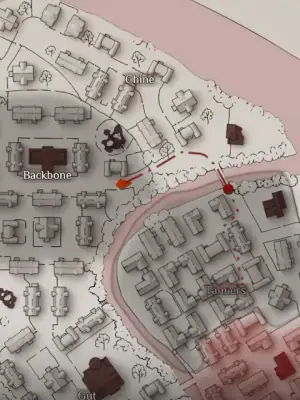
Map: View the map by pressing Y. Push RS to zoom in and use the right analog stick to navigate. The map updates based on explored areas and indicates locked or impassable sections with scribbles. Keys and symbols highlight important doors and areas.
Objectives: View objectives by pulling up the map (Y) and pressing X. A notebook icon appears when objectives are updated or added.
Weapon Wheel: Tap RB to bring up the weapon wheel. Use the left analog stick to highlight weapons and press A to equip. Press B to cancel. Tap RS to inspect a weapon. The flashlight can be turned on with X and the radio with Y within this menu. Weapons can also be cycled using the D-pad Left/Right.
Inventory Wheel: Tap LB to bring up the inventory wheel. Use the left analog stick to highlight items and press A to use. Press B to cancel. Tap RS to inspect an item. Health Drinks can be used with X and First Aid Kits with Y within this menu.
Flashlight and Radio: Turn on the flashlight with D-pad Up or via the Weapon Wheel (X). It helps in dark areas but attracts enemies, especially Nurses. The flashlight may turn off automatically after cutscenes. Turn on the Radio via the Weapon Wheel (Y). It emits static when enemies are near, serving as an early warning system, though it does not detect Order members. Keep the radio on at all times.
Health: Alex's health is shown as a red gauge on the left. It can be extended by collecting 8 serum items. To heal, use the Inventory Wheel: X for Health Drink (slight heal), Y for First Aid Kit (moderate heal). Serums fully restore health and extend the gauge. A tip for low health: saving and then reloading a low-health file can restore a small amount of health and remove limping.
| HEALING ITEM | HEALTH REPLENISH |
|---|---|
| Health Drink | Slight |
| First Aid Kit | Moderate |
| Serum | Full + Extend |
Combat Stance/Lock-on
Learn how to assume a combat stance and lock onto enemies in Silent Hill: Homecoming by holding LT. Switch targets by tapping the right stick.
- 1While a weapon is equipped, hold the LT button to assume a combat stance and lock-on to the closest enemy.
- 2Alex's flashlight will highlight the closest enemy.
- 3To switch targets, tap the right stick in the direction of the desired enemy to be targeted.
- Use the lock-on feature to focus your attacks on a single enemy.
- Pay attention to the flashlight's beam to confirm your current target.
- Practice switching targets quickly to manage multiple threats.
Weapons
Discover all the weapons available in Silent Hill: Homecoming. Learn about their stats, how to find them, and their effectiveness in combat against the horrors of Silent Hill.
This section of the guide will detail all the weapons Alex Shepherd can acquire and use throughout Silent Hill: Homecoming. Understanding your arsenal is make-or-break for survival against the town's terrifying inhabitants.
- Knife — A basic, readily available melee weapon. Useful for early encounters but lacks power and range.
- Hammer — A heavier melee option found throughout the game. Deals more damage than the knife but is slower.
- Shotgun — A powerful firearm effective at close to medium range. Ammunition can be scarce, so use it wisely.
- Pistol — A standard firearm that offers a balance of power and ammunition availability. Good for general combat.
- Assault Rifle — A high-powered automatic weapon. Very effective against groups of enemies but consumes ammunition quickly.
- Sledgehammer — A very powerful, albeit slow, melee weapon. Can stagger larger enemies.
- Fire Axe — A sturdy melee weapon offering good damage and reach.
- Screwdriver — A makeshift melee weapon, similar in function to the knife but potentially found in different locations.
- Baseball Bat — A common melee weapon, offering a decent balance of speed and power.
Players are encouraged to experiment with different weapons to find what best suits their playstyle and the specific challenges they face in Shepherd's Glen and Silent Hill.
Similar guides you might like




100% Human-Written. Community Verified. Learn how Ludo.guide verifies content