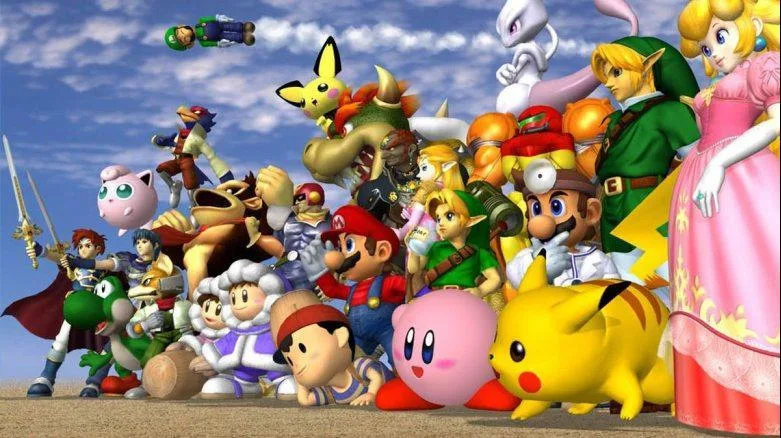
Welcome to the ultimate Nintendo crossover battle! Super Smash Bros. on Nintendo 64 throws you into fast-paced, lighthearted fights featuring iconic characters like Mario and others. Master essential controls and unleash devastating attacks as you battle it out on iconic stages. It's the perfect game for jumping in with friends for some fun, competitive action.
This guide will help you conquer every brawler and unlock hidden secrets. We'll cover strategies for mastering each character, navigating the classic stages, and understanding the controls. Get ready to dominate the ultimate Nintendo crossover!
Basic Controls
Learn the essential controls for Super Smash Bros. Ultimate, including movement, shielding, dodging, and various attacks on the ground and in the air. Improve your gameplay now!
This guide covers the basic controls and terminology for Super Smash Bros. Ultimate. For practice, use the Training Mode (Games & More → Training) on the 'Training' stage, which features a grid background to help visualize attack reach and launch distance. Enabling the Trajectory Guide in the Pause Menu is also recommended. For fundamentals, watch the 'How to Play' movie (Vault → Movies → How to Play). The Tips section (Vault → Tips → Techniques) also explains techniques and terms.
The following outlines movement, defense, and attack controls:
Moving and Defending your Fighter
Moving on the ground
Quickly flicking the left stick left or right makes your fighter run. Gently tilting it makes them walk, with slower speeds for gentler tilts. You can quickly reverse direction while running, but your fighter will skid. To avoid this, release the stick briefly before pressing the opposite direction.
Moving in the air
Pressing X/Y or Up on the left stick makes your fighter jump. A light tap results in a small hop. You can control jump direction with the left stick and move left or right while falling. Greater tilt on the stick results in more momentum. Most fighters have one mid-air jump (double jump), with exceptions like Kirby and Jigglypuff having more. You can easily change direction with a double jump. Falling off the stage edge grants only one jump. You can also jump off opponents' heads up to four times, with each jump being shorter. Pressing down in the air makes you fall faster. As of version 2.0.0, pressing two jump inputs (X and Y for GameCube, A and X for Pro Controller) simultaneously performs a short hop. This trick does not work if 'Up' is set to jump on the left stick.
Shielding and Dodging
Shield: Pressing ZR (R for GameCube) on the ground deploys a shield that blocks damage. Holding the shield or taking damage shrinks it. A broken shield leaves you stunned and vulnerable. Opponents can grab you while shielding. Shields regenerate when not in use.
Rolling Dodge: While shielding on the ground, tilting the left stick left or right performs a roll dodge in that direction.
Spot Dodge: While shielding, pressing down performs a spot dodge, allowing a quicker counter-attack than other dodges.
Air Dodge: Pressing ZR (R for GameCube) in the air performs an air dodge. You are limited to one air dodge per action; you can air dodge again after taking damage or landing.
Directional Air Dodge: Holding a direction while performing an air dodge makes you move in that direction. This aids positioning but leaves you more vulnerable after the dodge. Air dodges can be used for recovery.
Spamming dodges slows your fighter and reduces invincibility frames, making you susceptible to attacks.
Attacks
On the ground
Smash Attacks: Pressing A and a direction on the left stick simultaneously performs a Smash Attack, which has high launch potential. Holding A charges the attack, increasing damage and launch distance. The right stick can also be used for Smash Attacks if configured.
Neutral Attack: Pressing A performs a neutral attack. Many fighters can perform combos by repeatedly tapping A, with the final hit often having the most launch power. Neutral attacks are effective for racking up damage at close range.
Forward Tilt: Tilting the left stick in your facing direction and pressing A performs a Forward Tilt. These attacks generally have better reach and more damage than neutral attacks but are slower.
Down Tilt: Pressing the left stick down and then A performs a low-hitting attack. Some fighters have unique effects, like King K. Rool burying opponents or Incineroar launching opponents for juggling.
Up Tilt: Tilting the left stick up and pressing A typically launches opponents upward, enabling combos with subsequent Up Tilts or aerial attacks.
Tilt attacks can be assigned to the right stick/C-Stick via Smash → Controls → [Your Name] → [Your Controller] → Right Stick/C-Stick (defaulted to Smash Attack) → Tilt Attack → Save. This helps prevent accidental Smash Attacks.
Dash Attack: While running, pressing A performs a Dash Attack. The opponent is sent in your running direction, but missing can leave you vulnerable.
Grab: Pressing R (Z for GameCube) initiates a grab. Tapping the button adds minor damage. Tilting the left stick in a direction throws the opponent. Holding the grab too long allows the opponent to escape. Grabs can be used on shielding opponents. Missing a grab incurs significant lag, leaving you open to counter-attack.
In the Air
Neutral Aerial: Pressing A in the air performs a Neutral Aerial attack. Many fighters can chain these attacks for combos, with the final hit often having strong launch power. Neutral Aerials are useful for accumulating damage at close range.
Spirit Board
Learn how to navigate the Spirit Board in Super Smash Bros. Ultimate, understand spirit types, unlock more targets, and utilize board items effectively.
The Spirit Board in Super Smash Bros. Ultimate allows you to battle spirits trapped within puppet fighters. Winning these battles lets you free and obtain the spirits. As of Ver. 4.0.0, there are 951 spirits to collect, though some require summoning, specific challenges, or prior discovery in Adventure mode.
Accessing the Spirit Board: Navigate to Spirits → Spirit Board (Target List).
Spirit Symbols: The symbol in the top left corner of a spirit's artwork indicates its class. A hexagon denotes a Support Spirit, while a larger circle signifies a Primary Spirit. The shape itself doesn't affect combat but relates to team composition.
Spirit Types & Colors: The color of the symbol denotes the spirit's type, which dictates strengths and weaknesses. Having a type advantage provides a significant edge in battle.
- Red (Attack Type): Strong against Blue (Shield Type).
- Blue (Shield Type): Strong against Red (Attack Type).
- Green (Grab Type): Strong against Blue (Shield Type).
- Purple (Neutral Type): Has no strengths or weaknesses.
Only your primary spirit determines your team's type. Support spirits on the opponent's side still have their own types.
Timers: Each spirit on the board has a timer. Once it expires, a new spirit will appear. You must still wait for the timer to count down even after defeating a spirit.
Unlocking More Targets: Initially, you can choose from 6 spirits. Four padlocks on the edges of the board indicate potential increases to the maximum number of targets. Unlocking these requires meeting specific conditions:
- Battling Spirits: Repeatedly engaging with spirits (win or lose) unlocks additional targets. This includes milestones for 5, 15, and 30 battles. The 30-battle milestone is linked to unlocking the 'Ice Climbers' Challenge.
- Beat the 'Link' Challenge: Winning against a Legend class spirit (4-star ranking) grants an extra target.
These unlocking conditions can also be met within 'DLC Spirits' since Ver. 3.0.0.
Board Items: Located in the top right corner of the Target List, 'Board Items' offer various effects:
- Shuffle All: Reshuffles all spirits on the board.
- All Primaries: Reshuffles spirits to only show Primary Spirits.
- All Supports: Reshuffles spirits to only show Support Spirits.
- Filler: Fills any empty spaces on the board.
- Rematch: Restores a spirit that has disappeared from the board, either due to loss or timer expiration. You cannot rematch a spirit that has been replaced by a new one after its timer ran out.
Board items can be purchased with Gold or SP, earned through challenges, Classic mode rewards, or by defeating spirits. They can also be found passively through the 'Explore' activity, specifically with Charlie in Mushroom Valley, which takes 6 hours.
Using 10 board items secures the 'Sonic' challenge panel.
Fight Screen Conditions/Stage: The bottom left corner of the fight screen displays battle conditions and the stage, which vary based on the spirit being fought.
The Basics
Learn the basics of Super Smash Bros. Adventure mode, including managing save files, understanding spirits, and navigating the map.
Managing Save Files
You can have three Adventure save files. Any spirit you receive will be added and shared in your overall main save file. To delete an Adventure save file, select the file, hold L+R for three seconds, select 'Yes,' and then confirm by selecting 'I'M SURE!'
Difficulty
After selecting a new save file, you can choose between Easy, Normal, and Hard. This will impact how difficult each opponent is to defeat and the amount of rewards you'll receive.
Spirits
Spirits appear on the map as a glowing burning orb. When you approach a spirit, a box will appear above it showing you who the spirit is. The symbol next to the spirit's name is its class (Hexagon = Support Spirit / Triangle = Primary Spirit). The top right corner shows which puppet fighter you will be battling and their type. In the top left corner is the rating of the spirit. Once you have beaten the puppet fighter, the spirit will be added to your collection. You will also receive other rewards such as Gold, SP, and Skill Spheres. You cannot replay that space to farm rewards, but you can add multiples of the same spirit to your collection by playing through another Adventure save file. Spirits can also be found in some predetermined treasure chests. Most spirits found in treasure chests can initially only be unlocked this way but will appear on the Spirit Board once found. These spirits will not count towards file completion or spaces cleared.
Fight Screen
Selecting a space will bring you to the fight screen. In the bottom left corner are the list of conditions that will take effect during the battle and the stage you'll be fighting on. The conditions depend on the spirit you are fighting and can vary from what item the opponent will be holding to stage hazards like a poisonous cloud engulfing the stage. In the top right corner is a display with your opponent's face and their type. Flashing upward arrows mean the opponent has a type advantage against you, whereas downward arrows indicate you have a type advantage. The numbers show the strength of the opponent; the higher the number, the stronger the opponent. This number correlates to their star rank in the top left corner. A four-star rank spirit is much harder to fight than a one-star rank spirit. The color indicates which type your opponent is. Types tell you the strength and weakness of your opponent so you can create a spirit team that counters them. Having a team with a type advantage won't automatically give you the win but it will give you a big advantage. Green beats Blue, Blue beats Red, and Red beats Green. Green = Grab Type, Blue = Shield Type, Red = Attack Type. Grab beats Shield, Shield beats Attack, and Attack beats Grab. Purple indicates the Neutral type, which has no strengths or weaknesses. When you make a spirit team, only your primary spirit has a type, making your team that type. When you battle fighters with a support spirit, the opponent will still have a type. Here you can see the fighter you have selected and your team's type and strength. Flashing upward arrows mean you have a type advantage, whereas downward arrows indicate you are at a disadvantage. After clicking this option, in the bottom left corner you can switch your fighter (you can only select Kirby to begin with). Clicking Spirits (or pressing up) will allow you to individually change your primary spirit and support spirits, select a saved team, or save the team you have just made. When choosing a Support Spirit, if the spirit has a skill that counters the stage hazard like Poison Cloud, a small tick will appear on the lower left of their artwork in the spirit select screen. You can also filter for these skills by pressing R and then selecting the hazard skill you are after.
Maps / Portals
The map can be accessed by pressing L when on the overworld. Maps cannot be viewed when in a subworld (areas accessed through a portal such as the 'Base'). Portals are the blue circle with a white swirl in it displayed on the map. A star next to a portal signifies that the boss, fighters, and spirits in that portal have been saved. When you begin the adventure, most of the map is covered in mist. The maps provided in the Maps & Guide section have had the mist removed to help you navigate better and be able to follow along with this guide.
Skill Tree
Exchange Skill Spheres for Adventure Skills to improve your fighting capability and even improve the efficiency of Activities such as the Gym. Skill Spheres are rewarded for clearing spaces and occasionally sold in shops.
Summon
Learn how to summon spirits in Super Smash Bros. Ultimate by combining spirits, cores, and SP. Discover requirements and strategies for obtaining all summonable spirits.
Summoning spirits in Super Smash Bros. Ultimate allows you to obtain new spirits by combining existing spirits, cores, and SP (Spirit Points). This method is a primary way to acquire many spirits that may not be found elsewhere. You can access the summon feature by navigating to Spirits → Collection → Summon.
On the summon screen, you will see a list of spirits available for summoning. To view more spirits, you need to possess at least one of the required cores or spirits for their summon. Clicking on a spirit will display its requirements. The 'Owned:' counters indicate how many of the required spirits and cores you currently possess. The larger circle below the spirit's name shows the total number needed. You can select specific cores or spirits if you have duplicates or if a general requirement like 'Any Neutral Type' is listed. The 'Autofill' option will automatically select the best available cores and spirits from your collection, prioritizing cores. The game prevents you from sacrificing favorite spirits. The summon process automatically dismisses required spirits and grants bonus SP, eliminating the need to visit the dismiss menu beforehand.
If a spirit appears as a silhouette, it means you only have some of the requirements. Clicking on it will reveal the full list. A '!' next to 'Owned:' indicates a required spirit that you still need to find. If a spirit's artwork is visible with the name '???', you can obtain it through summoning. A visible spirit with a green tick in the top right corner means you already own it, but can summon another. A faded artwork with a green tick signifies you own the spirit but lack the requirements to summon another.
You cannot sell cores that are required for an unsummoned spirit. There are two milestones related to summoning: 'Summoned a spirit for the first time!' and 'Summoned a Legend spirit for the first time!'. Completing the Mewtwo [Spirits] challenge, which requires obtaining a Legend class spirit via Summon, rewards 5 Snack (L). A Legend class spirit has a rank of ⭐⭐⭐⭐.
Many summonable spirits can initially only be obtained through summoning, though some may appear in Adventure Mode. After summoning, these spirits can start appearing in the Spirit Board or the Vault Shop. The list below details all summonable spirits, their unlock methods, and requirements. There are a total of 133 spirits that can be summoned.
| No. | Rank | Name | Series | Class | Type | Unlock | Cost / Slot | Max Stats (Lv. 99) | Skill / Trait | Effect |
|---|---|---|---|---|---|---|---|---|---|---|
| 24 | ⭐⭐⭐⭐ | Gold Mario | Super Mario Series | Supports | - | Summon (Metal Mario + Super Mushroom + Fire Flower + 2,600 SP) | ⎔⎔⎔ | - | Super Armor | Makes it more difficult to flinch or be launched. |
| 28 | ⭐⭐⭐ | Cat Princess Peach | Super Mario Series | Primaries | Shield | Summon (Rover + Baby Peach + 1,200 SP) | ⎔⎔⎔ | Power: 9346 Attack: 4853 Defense: 4134 | Weight ↓ | Become faster, but also easier to launch. |
| 45 | ⭐⭐⭐ | Birdo | Super Mario Series | Primaries | Grab | Summon (T-Rex + Starly + 1,600 SP) | ⎔⎔ | Power: 8516 Attack: 3917 Defense: 4599 | None | None |
| 52 | ⭐⭐ | Thwomp | Super Mario Series | Supports | - | Summon (Rock Pikmin + Rocky + 1,200 SP) | ⎔⎔ | - | Weapon Resist ↑ | Decreases damage taken from melee weapons like swords and whips. |
| 64 | ⭐⭐ | Nabbit | Super Mario Series | Supports | - | Summon (Duster + Any Support + 1,300 SP) | ⎔ | - | Item Gravitation | Draws nearby items closer. |
| 66 | ⭐⭐ | King Bob-omb | Super Mario Series | Primaries | Attack | Summon (Shake King + Bob-omb + 1,000 SP) then Spirit Board | ⎔ | Power: 7248 Attack: 3590 Defense: 3248 | Strong Throw | Slightly increases the power of grabbing and throwing attacks. |
| 70 | ⭐⭐⭐ | Shadow Mario | Super Mario Series | Primaries | Neutral | Summon (Vince + Eddy + Any Neutral Type + 1,700 SP) then Spirit Board | ⎔⎔⎔ | Power: 8007 Attack: 4444 Defense: 3563 | None | None |
| 76 | ⭐⭐ | Sprixie Princesses | Super Mario Series | Supports | - | Summon (Wanda + Princess Shokora + 1,200 SP) | ⎔ | - | Fairy Bottle Equipped | Start battles with a Fairy Bottle. Heal when at least 100% damage is taken. |
| 78 | ⭐⭐ | Cappy | Super Mario Series | Supports | - | Summon (Ezlo + Boo Mario + 1,000 SP) then Spirit Board | ⎔ | - | Strong Throw | Slightly increases the power of grabbing and throwing attacks. |
| 93 | ⭐⭐⭐⭐ | Master Cycle | Mario Kart Series | Primaries | Grab | Summon (Mach Rider + City Tripper + Excitebike + Any Attack Type + 2,500 SP) | ⎔⎔ | Power: 10,440 Attack: 5471 Defense: 4568 | Speed ↑ | Slightly increases run speed. |
| 94 | ⭐⭐⭐ | Paper Mario | Paper Mario Series | Primaries | Neutral | Summon (Cut Man + Cardboard Box + Any Neutral Type + 1,700 SP) | ⎔⎔⎔ | Power: 9724 Attack: 5042 Defense: 3962 | Water Weakness | Increases the damage taken from water attacks. |
| 99 | ⭐⭐⭐ | Shadow Queen | Paper Mario Series | Primaries | Attack | Summon (Vivian + Gengar + 1,600 SP) | ⎔⎔ | Power: 9359 Attack: 5475 Defense: 3884 | None | None |
| 103 | ⭐⭐ | Mallow | Super Mario RPG: Legend of the Seven Stars | Supports | - | Adventure Mode / Summon (Prince Peasley + Kracko + 1,000 SP) | ⎔ | - | Trade-Off Attacks ↑ | Start battles with 30% damage and higher att |
Similar guides you might like




100% Human-Written. Community Verified. Learn how Ludo.guide verifies content