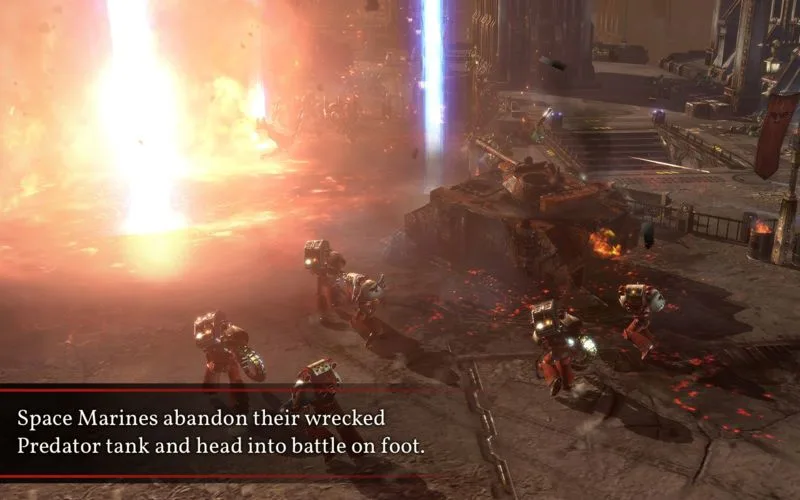
Welcome to the grim darkness of the 41st Millennium, Commander. Warhammer 40,000: Dawn of War II drops you into intense, squad-based tactical combat where you'll lead your elite forces through brutal campaigns. You'll manage your heroes, customize their wargear, and make critical decisions on the battlefield, all while battling against the galaxy's most dangerous threats, including the Ork Warbosses and the insidious forces of Chaos.
This guide is your frontline support for conquering Dawn of War II. We'll help you navigate the game's challenges, from mastering Ork and Space Marine tactics to understanding weapon roles and completing optional objectives. Whether you're aiming for that Gold Medal on every mission or just trying to survive the onslaught, we've got the intel you need to secure victory for the Imperium.
Index
Navigate "Warhammer 40,000: Dawn of War II" with this index covering missions, characters, wargear, enemies, and controls.
Sections:
- Update History
- Controlling Your Squad
- Characters
- Wargear
- Enemies
- Walkthrough
- 6.01 Stand with your Brothers
- 6.02 Retake the Hamlet
- 6.03 Skykilla's Raid
- 6.04 Target: Gutrencha
- 6.05 The True Enemy
- 6.06 Defend the Array
- 6.07 A Spider Among Flies
- 6.08 Defense of Argus Gate
- 6.09 Eyes of the Eldar
- 6.10 Vengance for Davian Thule
- 6.11 Fire Prism Assault
- 6.12 Hand of the Hive Mind
- 6.13 The Killer Serpent
- 6.14 Thundering Terror
- 6.15 Into the Hive
- 6.16 The Mantis Killer
- 6.17 Lord of Wraiths
- 6.18 Idranel of Ulwathe
- 6.19 Angel Gate
- 6.20 Secrets of Angel Forge
- 6.21 Greenskin Armor
- 6.22 Greenskin Weaponsmith
- 6.23 Rippa-Splitta
- 6.24 Remains of the Dark Age
- 6.25 The Wailing Doom
- 6.26 Raid Against the Warboss
- 6.27 The Last Stand
- About the Author
1. Update History
Discover the evolution of Dawn of War II! This guide covers the game's history, expansions like Chaos Rising and Retribution, and key gameplay updates.
2. Controlling Your Squad
Learn squad control in "Warhammer 40,000: Dawn of War II". Discover its light RPG and tactical shooter elements, including cover and gear.
Unlike most other real-time strategy games, "Warhammer 40,000: Dawn of War II" does not feature base building. Instead, it blends light RPG mechanics with tactical shooting. You will lean on cover (a mechanic that provides defensive bonuses) to overcome your enemies, gain experience to level up your squads over time, and equip them with better gear to combat the Xenos.
- Take advantage of cover to gain a tactical advantage in combat.
- Equip your squads with improved gear as you progress to enhance their effectiveness.
- Focus on leveling up your squads to unlock new abilities and improve their stats.
Use Cover!
Learn how to effectively use cover in Warhammer 40,000: Dawn of War II. Understand full vs. partial cover, squad positioning, and why cover is crucial for survival.
Alright, listen up! You're gonna learn real quick in Dawn of War II that if you don't use cover, the enemy will absolutely shred your Space Marines. They might be tough as nails, but they're usually outnumbered, so you've gotta be smart about how you approach fights.
Here's the deal: to get your squad into cover, just click on an object that provides it. You'll notice some colored dots appear on the ground around it when you hover your mouse over. Green dots mean it's full cover – your guys will be pretty much untouchable. Yellow dots mean it's only partial cover, so about half the incoming fire will be blocked. The number of dots tells you how many squad members can use that specific cover spot. So, if you see two yellow and one green dot behind a rock, two of your Marines get partial cover, and one gets the good stuff.
Generally, if your squad is in full cover, they'll barely take any damage. Seriously, it'd take something heavy like a heavy bolter to even scratch them. Yellow cover is better than nothing, but it's not ideal. Always try to get as many of your guys into full cover as you possibly can.
Here's a pro-tip: if you hold down the right mouse button while hovering over a cover object, you can actually drag your mouse around to fine-tune your squad's positioning. This lets you get them tucked into cover way more efficiently. It can make a huge difference in tough fights!
Similar guides you might like




100% Human-Written. Community Verified. Learn how Ludo.guide verifies content