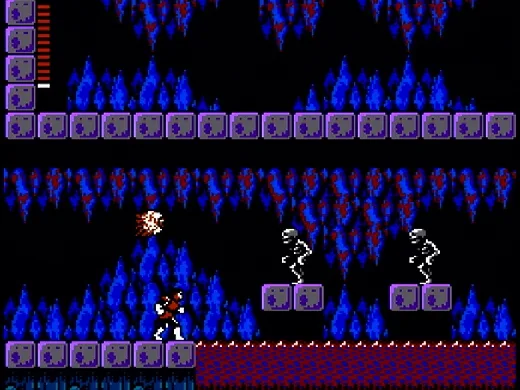
Castlevania II: Simon's Quest trades the linear castle-crawling of its predecessor for a sprawling overworld and a day/night cycle. You'll explore towns, gather cryptic clues from NPCs, and hunt down Dracula's scattered body parts—his Rib, Heart, Eyeball, and Nail—from five cursed mansions. It's a challenging, often cryptic adventure that demands careful resource management and a keen eye for hidden secrets.
This guide cuts through the confusion. We'll detail how to collect Dracula's five body parts, navigate each mansion like Berkeley, Rover, Brahm, and Bodley, and defeat the bosses guarding them. We also cover essential items and the infamous 13 clues to help you finally break Dracula's curse and achieve the best ending.
Story
Discover the dark narrative of Castlevania II: Simon's Quest. Learn how Simon Belmont must find Dracula's body parts to break a curse and heal his wounds.
You're Simon Belmont, the legendary gothic warrior. After defeating Count Dracula, you found yourself afflicted by a curse, the lingering pain from your duel slowly consuming you.
One day, a mysterious maiden appeared, revealing that you are possessed by Dracula's curse. She explained that your only path to salvation and healing is to locate the five scattered body parts of Count Dracula. These must then be burned within his very castle to finally end the Prince of Darkness's malevolent influence.
As the vision began to fade, she offered her final words of encouragement: "Fear not, brave Simon, for if you have the courage to risk your life, you will find the strength to win again."
Basics
Learn the ropes of Castlevania II: Simon's Quest! Understand the day/night cycle, how Hearts work for currency and XP, and navigate the menu screens to prepare for your quest.
Hey there! Ready to dive into the world of Castlevania II: Simon's Quest? This game throws a few unique twists at you right from the start, so let's get you up to speed on the basics so you can start your adventure with confidence.
The Day and Night Cycle
You'll notice the game flips between day and night. This isn't just for show; it actually ties into the game's endings and how long Simon's curse lasts. When night falls, and you get that classic line, "_What a horrible night to have a curse_," towns lock up and get swarmed by Zombies and Ravens. It makes things tougher, but hey, monsters drop more Hearts at night, which is super useful for grinding and leveling up. When morning arrives, you'll get another notification. Since it's real-time, we can't give you exact times, but this cycle is one of the things that makes Castlevania II feel pretty unique for its era.
Hearts, Experience, and Currency
Here's a big one: Castlevania II actually has an experience point system, unlike its predecessors! As you defeat enemies and collect Hearts, you'll gain experience. Generally, you can expect to level up about once per Mansion you clear, which boosts your health and defense – essential for tackling tougher areas. But Hearts aren't just for XP! They're also the game's currency. Yep, you'll be using Hearts to buy upgraded whips and other vital items. It's a bit quirky, but you'll quickly appreciate having them!
There are three types of Hearts you'll find:
- Small Heart: Gives you 2 Hearts and 1 Experience Point.
- Half Heart: Gives you 4 Hearts and 3 Experience Points.
- Large Heart: Gives you 6 Hearts and 5 Experience Points.
So, grab every Heart you can! We'll point out when grinding for Hearts is a good idea later on.
Status & Menu Screens
The on-screen HUD in Castlevania II is pretty minimal – mainly just Simon's health bar in the top left, which grows as you level up. For everything else, you'll need to pause and check the Menu. It's split into four sections:
- The top section shows your play time (which affects the ending!), your current experience and level, and your Heart count.
- The next line displays your current whip, which you can upgrade.
- The third line is your 'relic inventory'. This is where you'll find pieces of Dracula, like Dracula's Rib which grants a shield (don't ask how!). You'll also equip colored Crystals here, needed for navigating the world map.
- The bottom line shows your sub-weapons (Daggers, Holy Water, etc.) and items like Laurels and Garlic. You can equip your chosen sub-weapon here.
Endings
Remember that day/night cycle? The total in-game days it takes you to finish the game directly impacts which of the three endings you'll see. Time stops when you're inside Mansions, so you can use that to your advantage if you're aiming for a specific outcome. Here's the breakdown:
- Good Ending: Complete the game in 7 days or less.
- Normal Ending: Complete the game in 8–14 days.
- Bad Ending: Complete the game in 15 days or more.
We'll get into more spoiler-filled details about these at the end of the walkthrough!
Controls
Master the controls for Castlevania II: Simon's Quest on NES and Virtual Console. Learn button functions for D-Pad, A, B, Start, and Select.
Controls are based on the original NES Instruction Manual.
NES Controls:
- D-Pad: Press Up or Down to ascend or descend stairs. Press Left or Right to move horizontally. Press Up when in front of a door to enter. Press Down to squat and avoid enemy projectiles.
- Select Button: Press to pause the game.
- Start Button: Press to begin the game. During gameplay, press to display the "Multi Screen", where you can select weapons and magical items. Press again after selection to return to the game.
- A Button: Press to jump.
- B Button: Press to lash with your whip. Pressing A and B simultaneously allows you to jump and whip. Press B to talk with Transylvanian villagers and merchants.
How to Use Certain Weapons:
Press Up on the D-Pad while pressing the B Button to throw Holy Water or Dagger, drive in the Oak Stake, use the Flame, or place Garlic.
Virtual Console Controls (3DS/Wii/Wii U):
Castlevania II: Simon's Quest was originally on the Famicom Disk System (FDS) and NES, and is available on the 3DS/Wii U Virtual Console. The 3DS and Wii U are recommended for beginners due to their save state system. These versions are exact emulations of the NES original. The Wii/Wii U Virtual Console versions support multiple control inputs: Wiimote, Classic Controller, GameCube Controller, or Wii U GamePad.
Button Key for Virtual Console:
The following buttons on the 3DS, Wiimote, Classic Controller, GameCube Controller, and Wii U GamePad correspond to their NES counterparts:
- 3DS Circle Pad = NES D-Pad
- Wiimote D-Pad = NES D-Pad
- Wii Classic Controller D-Pad = NES D-Pad
- GameCube Analog Stick = NES D-Pad
- Wii U GamePad Left Analog Stick = NES D-Pad
- 3DS D-Pad = NES Select (Note: This mapping appears to be an error in the source, as the D-Pad is typically mapped to movement. Assuming standard mapping for movement.)
- Wiimote Left Analog Stick = NES D-Pad (Note: This mapping appears to be an error in the source, as the Left Analog Stick is typically mapped to movement. Assuming standard mapping for movement.)
- 3DS B Button = NES B Button
- Wiimote 1 Button = NES B Button
- Wii Classic Controller B Button = NES B Button
- GameCube B Button = NES B Button
- Wii U GamePad B Button = NES B Button
- 3DS A Button = NES A Button
- Wiimote 2 Button = NES A Button
- Wii Classic Controller A Button = NES A Button
- GameCube A Button = NES A Button
- Wii U GamePad A Button = NES A Button
- 3DS Start Button = NES Start Button
- Wiimote + Button = NES Start Button
- Wii Classic Controller + Button = NES Start Button
- GameCube Start Button = NES Start Button
- Wii U GamePad + Button = NES Start Button
- 3DS Y Button = NES Select Button
- Wiimote - Button = NES Select Button
- Wii Classic Controller - Button = NES Select Button
- GameCube Z Button = NES Select Button
- Wii U GamePad - Button = NES Select Button
Other Controls (3DS):
- L + R + Y: Switch between first and second controllers (second controller is not used).
- Touch Screen: Access the Virtual Console Menu to Resume Game, Reset, or Create/Load Restore Points.
- Home Button: Bring up the Home Menu while pausing the game; press again to hide it and resume play.
Other Controls (Wiimote & Wii Classic Controller):
- Home Button: Bring up the Home Menu while pausing the game; press again to hide it and resume play.
Other Controls (Wii U GamePad):
- Touch Screen: Access the Virtual Console Menu to Reset, change Controller Settings, or Create/Load Restore Points.
- Home Button: Bring up the Home Menu while pausing the game; press again to hide it and resume play.
Walkthrough
Begin Simon's quest in Castlevania II: Simon's Quest to gather Dracula's remains and break a curse. Read the manual for story details.
- 1The previous section covered the Basics.
- 2The next section will cover (press the cover button to crouch behind walls or objects) Berkeley Mansion – Dracula's Rib.
- The in-game text does not provide much story; rely on the manual for narrative details.
Similar guides you might like




100% Human-Written. Community Verified. Learn how Ludo.guide verifies content