Welcome to Dance Dance Revolution, Konami's rhythm game that puts your reflexes and sense of rhythm to the ultimate test! Since its release in 1998 on PC and PlayStation, DDR has challenged players to hit arrow prompts in time with the music, either solo or against friends. It's a game that's easy to pick up but offers incredible depth for those who want to master every step and conquer the dance floor.
This guide is here to help you navigate the challenging tracks and master every step. We'll cover advanced techniques, character overviews, and survival tips to help you achieve the highest scores. Whether you're a beginner just starting out or an expert looking to refine your skills, this guide will provide strategies for the most demanding songs and help you achieve top performance.
2A. LEARNING THE BASICS WITH GAME MODE
Master Dance Dance Revolution's standard Game Mode! Learn about panel styles, difficulty levels (Beginner to Oni), Groove Radar, and arrow options like Speed, Appearance, and Modify.
This section covers the standard Game Mode in Dance Dance Revolution, ideal for newcomers before tackling more complex modes like Quest Mode.
Game Mode Setup:
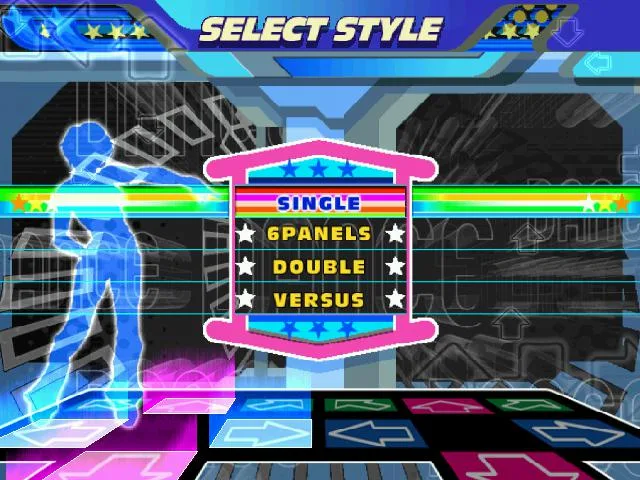
- Select Style:
- 4 PANELS: Standard gameplay with one dance pad per player.
- 8 PANELS: Each player uses two pads. This is a one-player mode on PS2 but can be played with two players on other consoles. Note that song step charts differ from 4 Panels mode.
- Setup Players Screen:
- Press 'A' to join as additional players.
- Use 'X' and 'Y' to select characters.
- Use Up and Down to choose the difficulty level.
Difficulty Levels:
- BEGINNER: Very easy, suitable for absolute beginners. Not recommended for skill improvement.
- BASIC: Easiest normal difficulty (2-5 feet). Steps are mostly on the beat.
- DIFFICULT: Moderate difficulty (4-7 feet). Steps follow the music more closely.
- EXPERT: High difficulty (6-9 feet). Steps closely match the song or are significantly challenging.
- ONI: An alternate, often harder, Expert chart (true 10-footers). Some Oni charts can be easier than their Expert counterparts.
Select Music Screen:
- Use Left and Right to switch songs.
- Up and Down can change difficulty without returning to the previous screen.
- Groove Radar: A graphical representation of song difficulty across five attributes:
- STREAM: Total number of steps.
- VOLTAGE: Density of steps within a given time.
- AIR: Number of double steps (jumps).
- FREEZE: Number and duration of Freeze Arrows.
- CHAOS: Number of non-standard steps (not quarters/eighths) or steps requiring turns.
- Press 'A' to confirm song and difficulty.
- Select 'Random' to let the game choose.
- Song Ordering:
- Default Order: Standard logical order.
- ABC Order: Songs organized alphabetically in folders.
- BPM Order: Songs sorted by maximum Beats Per Minute (fastest to slowest).
- Artist Order: Songs sorted alphabetically by artist name.
Arrow Options (Hold 'A' when selecting a song):
- SPEED: Adjusts arrow scroll speed (0.5x to 8x) to improve readability.
- BOOST: Arrows gradually speed up as they approach the step zone.
- APPEARANCE:
- Visible: Default.
- Hidden: Arrows vanish halfway up.
- Sudden: Arrows appear halfway up.
- Phantom: Arrows appear very briefly halfway up.
- Stealth: Arrows are completely invisible.
- TURN:
- Off: Default.
- Mirror: Rotates arrows 180 degrees.
- Left: Rotates arrows 90 degrees left.
- Right: Rotates arrows 90 degrees right.
- Shuffle: Reverses positions of two random sets of arrows.
- OTHER:
- Off: Default.
- Flat: All arrows are the same color.
- Solo: Different colors for different note types.
- Dark: Removes the step zone from the screen.
- Help: Certain arrows glow yellow to restore more dance gauge.
- MODIFY:
- Off: Default.
- Cut: Removes non-quarter notes.
- LR-only: Converts all steps to left or right arrows.
- All jump: Converts every pair of steps into a jump.
- All freeze: Converts every step into a freeze arrow.
- No jump: Removes all jump steps.
- No freeze: Removes all freeze steps.
- REVERSE: Arrows scroll from top to bottom.
Gameplay: Step on arrows as they reach the step zone. Accuracy is rated with 'PERFECT' being the highest.
4A. Don't Play Nice - Verbalicious
Dance Dance Revolution's Don't Play Nice by Verbalicious is a tough Hip-Hop Expert chart with 318 steps and 82 jumps. Learn more at Ludo.
About The Artist: Verbalicious is Natalia Keery-Fisher, a British musician, actress, and MC. She appeared on "All About Me" and "The Archers." Her music career is largely defined by this 2005 hit.
Song Details:
- BPM: 105
- Genre: Hip-Hop
- Song Type: License
- Bemani Debut: Brand New!
Chart Details:
- BEGINNER: 78 Steps, 1 Jump, 0 Freezes
- BASIC: 118 Steps, 18 Jumps, 1 Freeze
- DIFFICULT: 209 Steps, 43 Jumps, 18 Freezes
- EXPERT: 318 Steps, 82 Jumps, 68 Freezes
Expert Notes: This is considered one of the toughest Hip-Hop songs in Dance Dance Revolution. It features extensive stream sections and many small sixteenth note clusters that often follow the lyrics, along with 82 jumps. While initially difficult, the chart can become enjoyable once mastered.
4B. Everytime We Touch (Radio Mix) - Cascada
Dance Dance Revolution guide for Cascada's "Everytime We Touch (Radio Mix)". Details BPM, chart stats, and Expert notes.
- 1Beginner difficulty features 120 steps and 2 jumps.
- 2Basic difficulty has 131 steps, 4 jumps, and 40 freezes.
- 3Difficult difficulty requires 227 steps, 18 jumps, and 19 freezes.
- 4Expert difficulty has 301 steps, 27 jumps, and 32 freezes.
Expert Notes: Be alert, the steps start quickly on this one. The song itself is mostly simple medium-length streams, with a crossover or two. The one trick that might trip you up is the placement of a few three-note sixteenth clusters, thrown in right after jumps.
About The Artist: Cascada is a German Eurodance act consisting of Natalie Horler, DJ Manian, and Yann Pfeiffer. This song, released in 2005, is generally considered to be Natalie Horler's biggest hit.
Miscellany: This song has a special music video, which nullifies the dancing characters. The chorus is borrowed from another song of the same name, released by Maggie Reilly in 1992.
- Focus on the three-note sixteenth clusters that appear after jumps on Expert difficulty.
- Practice medium-length streams to build stamina.
- Be prepared for a quick start on the Expert chart.
4C. Feels Just Like It Should - Jamiroquai
Dance Dance Revolution 4C. Feels Just Like It Should by Jamiroquai (87 BPM, Funk). Learn about Expert steps, special music video, and Bemani debut.
About The Artist: Jamiroquai is a Grammy-winning UK funk/soul/disco band headed by Jay Kay. This song is the first single from their 2005 album, "Dynamite."
Miscellany: This song features a special music video that replaces the dancing characters. A cover (press the cover button to crouch behind walls or objects) version by LH MUSIC CREATION appeared on the arcade version of SuperNOVA.
Stats:
- BEGINNER: 53 Steps, 2 Jumps, 6 Freezes
- BASIC: 94 Steps, 9 Jumps, 6 Freezes
- DIFFICULT: 168 Steps, 0 Jumps, 12 Freezes
- EXPERT: 273 Steps, 30 Jumps, 18 Freezes
Expert Notes: Slow songs in Dance Dance Revolution tend to follow the rhythm closely, and this is no exception. Paying attention to the song is a must. The Expert difficulty (7) features offbeat jump streams, gallops, and sixteenth note clusters that follow the song's rhythms.
Similar guides you might like





100% Human-Written. Community Verified. Learn how Ludo.guide verifies content