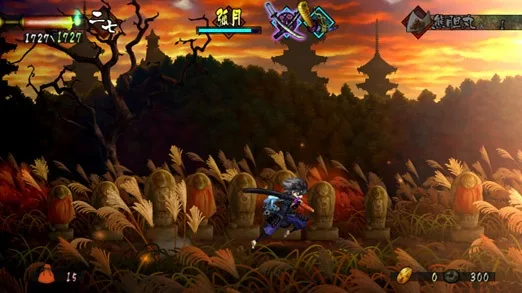
Welcome to Muramasa: The Demon Blade, VanillaWare's gorgeous Wii action-RPG. You'll be playing as either the graceful princess Momohime or the swift samurai Kisuke, navigating a beautifully hand-drawn feudal Japan. Your main goal is to gather the scattered fragments of legendary demon blades, each with its own unique abilities and drawbacks. Expect fast-paced combat, challenging boss fights against fearsome demons, and a lot of exploration across treacherous landscapes.
This guide is here to help you master the art of swift combat and unlock the secrets of these legendary blades. We’ll cover efficient farming techniques to gather the resources you need, provide expert strategies for defeating powerful demons like the fearsome Gengetsu and the formidable Kongoh, and help you navigate the game's various paths and challenges to achieve the best possible outcome.
o Important
Navigate Muramasa: The Demon Blade with ease! Learn all button prompts, analog stick functions, and menu controls for a smoother gameplay experience.
Hey there! So you're diving into Muramasa: The Demon Blade? Awesome choice! Let's get you up to speed on how to actually play the game. This section breaks down all the buttons and controls so you don't get lost before you even start swinging that sword.
Controls:
- L button: This one's not used, so don't worry about it.
- R button: Also not used. Easy peasy!
- D-pad: This is your go-to for managing items and actions. Press Down to use an item, and Left or Right to cycle through your equipped items.
- L analog stick: This is how you'll move your character around the world. Keep pressing Down on it, and your character will crouch.
- R analog stick: Use this to aim your attacks or abilities.
- Start button: Brings up the main menu screen. This is where you'll manage your inventory, skills, and other important stuff.
- Select button: Handy for bringing up the in-game map. Always good to know where you are!
- X button: Your primary action button. Use it to jump, perform a double jump, inspect objects in the environment, or talk to characters.
- Square button: This is your main attack button. You'll also use it for inspecting things and talking to people.
- Triangle button: Switch between your currently equipped swords with this. Gotta have the right blade for the job!
- Circle button: Unleash your character's powerful Secret Art with this button. Save it for when you really need it!
Similar guides you might like

100% Human-Written. Community Verified. Learn how Ludo.guide verifies content