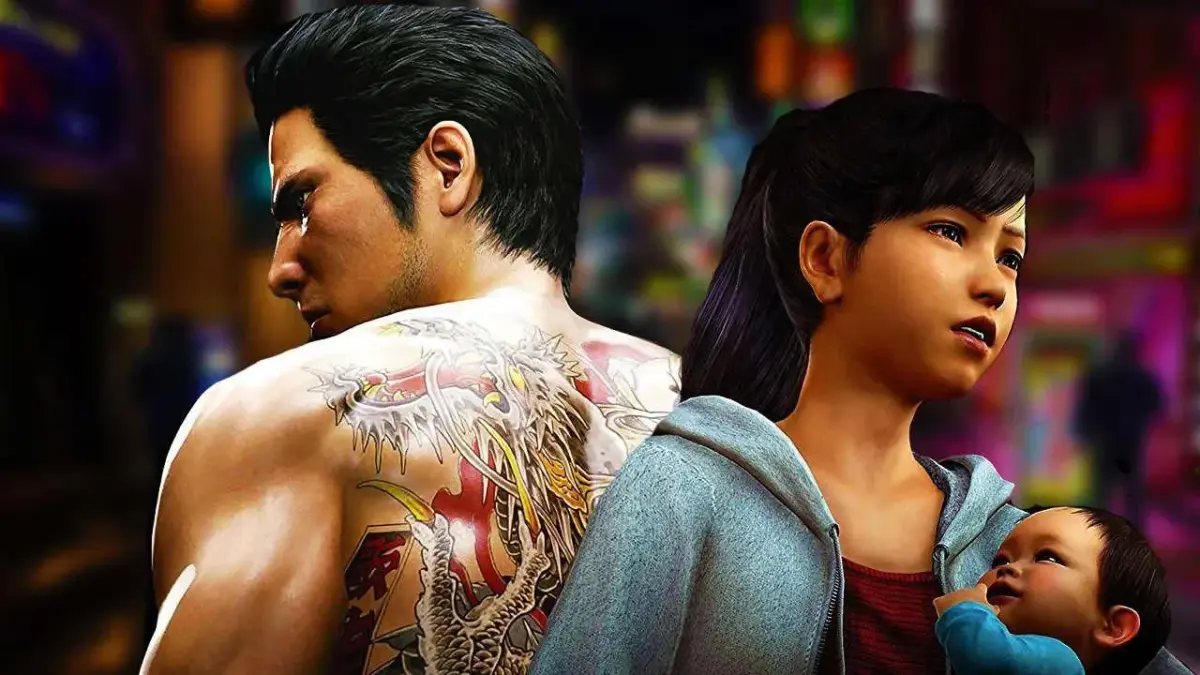
Yakuza 6: The Song of Life puts you back in the shoes of Kiryu Kazuma, the legendary Dragon of Dojima. After serving three years in prison, Kiryu returns to find Haruka missing and learns she's been in a hit-and-run, leaving her baby, Haruto. Kiryu takes custody of the child and travels from Kamurocho to the seaside town of Onomichi in Hiroshima to uncover the truth behind Haruka's accident. This RPG is a story-rich, open-world adventure where you'll navigate gripping story chapters, engage in deep combat, and tackle numerous substories.
This guide is here to help you through Kiryu's emotional journey and every challenge he faces. We'll cover the main story walkthrough, all the side-splitting substories, and help you track down every collectible, including Safe Keys, Cats, and Clan Codes. Plus, we've got tips for mastering the mini-games and extras, ensuring you don't miss a thing as you unravel the mystery of Haruka's fate.
Menus
Navigate Yakuza 6's menus like a pro! Learn about the Title Menu, Pause Menu, Game Settings, and Audio Settings to customize your experience.
Alright, let's break down the menus in Yakuza 6. Think of them as your command center for everything from starting a new game to tweaking the game's settings. We'll cover the main ones you'll be using.
Title Menu
This is what you see when you first boot up the game. It's pretty straightforward:
- New Game: Exactly what it sounds like – start a fresh adventure. You'll pick your difficulty here before diving in.
- Continue: Load up a save file and jump back into where you left off.
- Memories: Want to catch up on the story? This lets you view text recaps of Yakuza 1 through 5. Handy if you're new to the series or just need a refresher.
- Game Settings: Access the main game options. We'll detail these below.
- Audio Settings: Tweak your sound options. More on that in a bit.
- 2-Player Vs. Minigames: Feeling competitive? You can challenge a friend here in games like Virtua Fighter 5 FS or Puyo Puyo.
Keep an eye out, as some extra options pop up on the Title Menu after you've beaten the game. We'll touch on those in the Completion section.
Pause Menu
This is your go-to menu during gameplay, accessed by hitting the Options/Menu button (when you're not in a cutscene, of course). It's all tied to Kiryu's Sony Xperia phone.
Your phone screen shows your current cash (bankroll) and your experience points in various categories. Tapping the icons brings up different sections:
- Tasks: Shows your current main story objective and any Substories you've made progress on.
- Items: Your inventory. It's split into Recovery, Food/Drink, Other, and Valuables. Unlike older Yakuza games, there's no Item Box here. Instead, each item has a limit on how many you can carry – for example, you can only hold five Toughness Zs at once.
- Stats: This is where you'll spend your earned experience to upgrade Kiryu. You can also equip Gear from this screen.
- Clan Creator: Once you unlock it, you can check your Clan Creator progress here.
- Inbox: All your incoming texts will be displayed here.
- Troublr: Access the Troublr App to find out where Kiryu can help out around town.
- Photos: Your album of pictures you've taken.
- Awards: Track your progress on various in-game achievements and completion goals.
- Settings: This brings up a sub-menu with more options:
- Character Profiles: View details on the major characters as they appear.
- Controls: A handy reference for the game's button mappings.
- Game Settings: More options for gameplay adjustments (see below).
- Audio Settings: More sound tweaks (see below).
- Save: Choose which file the game should autosave to.
- Quit Game: Exit the game and return to the Title Menu.
Game Settings
You can access this from either the Title Menu or the Pause Menu.
- Difficulty: Adjust how challenging the game is. Note: You can only change this while actively playing, not from the main Title Menu.
- Auto Camera: When on, the camera will adjust itself as you move into different situations. Turn it off if you prefer manual control.
- Camera Control: This lets you customize how the camera behaves. You can set Vertical and Horizontal movement to 'Normal' (matches Right Stick) or 'Inverted' (opposite of Right Stick).
- Camera Movement Speed: Fine-tune how quickly the camera moves when you're controlling it.
- Minimap Display: Toggle the minimap in the lower-left corner on or off.
- Minimap Rotation: If this is on, the minimap spins to match your camera's direction. 'Fixed' keeps North always at the top.
- Subtitles: Turn these off if you want to play without text during cutscenes – good luck if you don't understand Japanese!
- Blood Level: Set to 'Mild' to reduce blood splatter during regular combat. Cutscenes usually keep their normal blood effects.
- Gamma and Brightness: Basic screen adjustments. It's usually best to calibrate your TV first, but these can help if the game looks too dark or washed out.
Audio Settings
Also accessible from the Title Menu or Pause Menu.
- Headphone Volume: If you're using headphones, adjust their volume here. Make sure your system is set to output audio to headphones first.
- Controller Speaker: Turn this on to have phone-related sounds play through your controller's speaker instead of your TV.
- Controller Volume: Adjust the volume specifically for the controller speaker.
- Ringtone: Choose the ringtone for Kiryu's cell phone.
- Speaker Type: Select doesn't matter if you're using Stereo or Surround sound.
- Front: If you have a surround setup, this lets you adjust the sound angle for your front speakers.
You'll find other, more specific menus within certain minigames or situations, but those are usually explained right where you find them.
Basic Controls
Get a grip on Yakuza 6: The Song of Life! This guide breaks down all the essential exploration, menu, and combat controls for PlayStation and Xbox controllers.
Alright, let's get you moving and grooving in Kamurocho! Yakuza 6: The Song of Life gives you a few ways to control Kiryu, depending on whether you're just strolling around, messing with menus, or getting into a scrap. This guide covers the standard PlayStation and Xbox controller layouts. If you're on PC and using something else, don't sweat it – you can usually remap buttons in the game's settings. Just remember, the button prompts here are for those two main controllers!
Exploration Controls
This is how you'll get around the city, check out the sights, and generally exist as Kiryu. Think of it as your basic walking-around controls.
| PlayStation | Xbox | Control |
| Move your character | ||
| Move the camera | ||
| Interact Hold down to sprint while walking |
||
| Center camera behind you | ||
| Enter first-person mode | ||
| View map | ||
| Enter Pause Menu | ||
| Use Phone Camera | ||
| Check Inbox | ||
| Open the Troublr App |
Menu Controls
When you're not out on the streets, you'll be navigating menus for all sorts of things. These are pretty standard for most games, so you should feel right at home.
| PlayStation | Xbox | Control |
| Move cursor | ||
| Confirm (Use on Items screen) | ||
| Cancel/Exit | ||
| Sorting Items on Items screen | ||
| Discard on Items screen | ||
| Used in some menus to toggle screens | ||
| Exit Menu |
Combat Controls (Typical)
This is where things get interesting! When fists start flying, you'll need to know these buttons like the back of your hand. Mastering these is key to surviving the rougher parts of Kamurocho.
| PlayStation | Xbox | Control |
| Move your character | ||
| Move the camera | ||
| Light Attack/Rush Combo | ||
| Heavy Attack Finishing Blow Heat Action |
||
| Evade | ||
| Grab Throw enemy/weapon |
||
| Guard Change Grab while holding someone |
||
| Fighting Stance | ||
| Extreme Heat Mode | ||
| Center Camera Hold to negate Heat Actions |
||
| Pause the game |
For a deeper dive into how to really throw down, check out the Combat and Abilities section, specifically the Basic Combat part. It's got more tips to make you a dragon in the streets!
FAQ
Answers to frequently asked questions about Yakuza 6: The Song of Life, including its release, rating, and gameplay differences.
What is Yakuza 6: The Song of Life?
Yakuza 6: The Song of Life is the seventh mainline game (counting Yakuza 0) in the series of the same name by SEGA, also known in Japan as "Ryu ga Gotoku" ("Like a Dragon"). The game was released in late 2016 for the PlayStation 4 in Japan and in 2018 for other territories. It was later released in 2021 on Xbox One and Steam.
Is this a good game to start the Yakuza series with?
As the final chapter of a seven-part story, this is not the best place to start the series. However, Yakuza games are designed so they can be played individually without necessary knowledge of prior events. If you do not care about past games and want to check out the series at its most current, you can begin here. For a better starting point, consider Yakuza 0, available on the same systems, which serves as a great introduction to the series. Alternatively, Yakuza Kiwami, a modern remake of the first Yakuza game, is also a good option.
What is this game rated?
This game is rated "M" for Mature by the ESRB. It includes the content descriptors of: Blood, Intense Violence, Partial Nudity, Sexual Content, Strong Language, and Use of Alcohol. The game depicts Japanese organized crime and its associated illegal activities. Combat can be brutal, especially the "Heat Actions" (special combat moves), but while blood sprays, it is not overt and there is no gore. Sexual content includes a live chat minigame where models may remove their shirts to reveal bikinis.
Who do you play as in this game?
You play as series protagonist Kazuma Kiryu, and only Kiryu, as this is his final chapter.
What is different about Yakuza 6: The Song of Life compared to previous games?
Key differences include:
- The game is built on the new Dragon Engine, offering upscale graphic fidelity and detail, though some kinks were not fully ironed out.
- Saving is now automatic, with manual saves available from the Settings Menu constantly overwriting the current file.
- There are no transitions between streets and storefronts; you walk directly into buildings.
- Kamurocho has been slightly reduced, with the Champion District and most of Park Boulevard inaccessible.
- A new district, Jingaicho in Onomichi, Hiroshima prefecture, is available to explore.
- The experience system is overhauled, with five types of experience points to accrue and apply to stats.
- A "hunger meter" is introduced; once full, food no longer provides experience benefits.
- Vending machine drinks can provide temporary in-game effects.
- Minigames are overhauled, with some classics removed in favor of new ones.
- There are no keepable weapons; weapons are limited to those pulled off enemies in combat and disappear at the end of battle. Gear can still be equipped.
- Lockers and Locker Keys are replaced with Safes, with fewer of them in the game.
How do I save in this game?
Phone booths are gone. The game autosaves constantly. To create a file you can return to, use the Save function in the Settings menu to create a new file. For example, to save before playing Mahjong, go to the Mahjong parlor, create a new save file, play, and if you lose, quit the game and Continue from that previous file. Creating a new save file essentially assigns it as your autosave.
What is in the demo for this game?
The free "Prologue" demo for Yakuza 6: The Song of Life allows you to see the first hour or so of (cutscenes) and begin Chapter 1. Story progression is blocked when you are told to go to Little Asia. You can explore Kamurocho, start some Substories, eat at restaurants, shop, play minigames like Karaoke, Mahjong, and RIZAP, and fight street thugs. You can spend experience to upgrade base stats but cannot buy skills. Your save file transfers to the full game, and most trophies are applied shortly after starting. The demo is large, over 36 gigabytes.
I found a photograph on the street! What can I do with it?
Check out Spirit Photography.
Hints & Tips
Get the edge in Yakuza 6: The Song of Life! Learn essential combat, buff, and crowd-control tips to dominate Kamurocho and Onomichi.
Hey there! So you're diving into Yakuza 6: The Song of Life, huh? Awesome choice! This game throws a lot at you, so I've put together some pointers to help you get the most out of your experience. Let's get you prepped!
XP is King: Don't forget that you earn experience points (XP) not just from fighting, but also from eating and completing those awesome side stories (Substories). Make sure you're actively upgrading Kiryu's stats. There's a ton of stuff to spend that XP on, and having a well-developed Kiryu makes everything smoother.
Embrace the Heat Actions: Seriously, these are your bread and butter in combat. You build up Heat from just wailing on enemies, so why not make it flashy? Heat Actions deal massive damage, often to multiple foes at once. They can be the difference between a quick win and a long, drawn-out brawl. Don't leave them on the table!
Extreme Heat is Your Friend: When you've built up enough Heat, consider activating Extreme Heat. This gives Kiryu a serious buff, letting him absolutely demolish enemies way faster than usual. Plus, it unlocks the ability to grab and use those huge, heavy weapons lying around. Smash everything!
Crowd Control Trick: Getting swarmed by a bunch of thugs? Here's a solid move: grab one enemy, then press the Grab button again. Kiryu will spin that poor soul around and toss him, knocking down everyone nearby. It's a lifesaver when you're outnumbered.
Weapon Up: Facing enemies with a ton of health? Always keep an eye out for weapons scattered around the environment. Bikes, couches, street signs – you name it. Even basic attacks with these will do way more damage than your fists. Use them to chip away at those tougher opponents.
Vending Machine Buffs: See a vending machine? Grab a drink! Downing one before a fight gives you a temporary buff. You don't have to chug it immediately; you can hold onto the effect. Just be quick about it – if an enemy interrupts you mid-drink, you'll lose the item and the buff!
Health Management: Keeping Kiryu healthy is key. You can restore health by grabbing a bite at one of the many restaurants, or by using recovery items like Toughness or Staminan drinks. Always try to have a few of these energy drinks on hand, especially before diving into a tough story mission. You never know when you'll need that quick heal.
Hope these tips help you out! Keep fighting the good fight in Yakuza 6!
Similar guides you might like






100% Human-Written. Community Verified. Learn how Ludo.guide verifies content