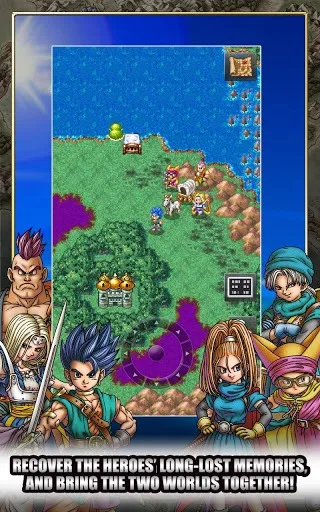
Welcome to Dragon Quest VI: Realms of Revelation! This is a classic turn-based RPG where you'll explore a vast world, recruit a party of diverse characters, and battle monsters. You'll spend your time leveling up, mastering different jobs to gain new skills, and uncovering a story that spans multiple worlds. It's a grand adventure perfect for anyone who loves a deep, engaging JRPG experience.
This guide is here to help you navigate the challenges of Dragon Quest VI. We'll cover everything from essential early-game quests, like obtaining the crucial Spirit's Harp, to advanced strategies for efficient job grinding. Whether you're struggling with a tough boss or looking to optimize your party's progression, you'll find the information you need to conquer this epic journey.
II. G A M E B A S I C S ............................................. *BASIC
Discover the core gameplay mechanics of Dragon Quest VI: Realms of Revelation. Learn about the Vocation system, character progression, and the vast world.
- 1The Vocation system returns, similar to Dragon Quest III and VII.
- 2At Alltrades Abbey, characters can train in one of nine starter Vocations.
- 3Each Vocation affects character stats, increasing some and decreasing others.
- 4Mastering two or three starter Vocations allows characters to change into advanced Vocations.
- Graphics and gameplay are improved from Dragon Quest V, leaning on a 32-megabit cartridge.
- Navigation remains similar to previous games.
- Turn-based battles are presented in first-person view.
01. CONTROLS
Learn the Dragon Quest VI controls, including button functions for Y, X, A, B, shoulder buttons, and the directional pad.
The stylus is not used at all except for one mini-game.
Button Functions:
- Y: Press at any time to view the local map (town or world map). Press again to see the contents of all shops in a town, or to see your current position on the whole world map.
- X: Brings up the main menu.
- A: Action button.
- B: The back button. Use this to exit a menu. Also used for Party Chat when with a group.
- Shoulder buttons: Used to change the camera angle. Very important in some places!
- Start and Select: Not used.
- Directional pad: For moving, and to scroll through items or party members.
02. SAVING YOUR GAME
Learn how to save your progress in Dragon Quest VI by speaking to nuns or priests, and understand the difference between permanent and temporary saves.
- 1Locate a church within the game world.
- 2Approach the nun or priest standing at the altar.
- 3Speak to them to initiate the saving process.
- You are allowed three permanent saves for your game data.
- A temporary save can be made anywhere outside of a church by suspending the game.
- This temporary save allows you to quit and reload your game from that exact point later, useful when no church is nearby.
03. MAIN MENU
Learn about Dragon Quest VI's main menu options: Talk, Magic, Items, Examine, Attributes, and Miscellaneous. Access it by pressing X.
- 1Press the X button to open the main menu. Press B to cancel.
- 2Talk: Use this command to speak with Non-Player Characters (NPCs) or party members. If other characters are in your party, they will offer comments related to the current situation. Use the B button to activate "Party Chat" for these comments.
- 3Magic: This option displays your current party, including those in the wagon. Use the directional buttons to view each individual's current Magic Points (MP) on the bottom screen and all spells usable in the Field on the top screen. Press A to select spells.
- 4Items: Similar to Magic, this shows your current party. Use the directional buttons to view each individual's items, including equipment. Select the Bag to view all held items and press A to choose one. Within the Item Menu, you can:
- Use: Select to use the item.
- 5Transfer: Select to move the item elsewhere.
- 6Discard: Throw away the item, with a chance to change your mind.
- 7Equip: Equip weapons, armor, or accessories.
- 8Peep*: Get additional information about any item, its uses, who can equip it, and its selling price. Note: The "Peep" option is learned as a spell by the Hero early on and can reveal the contents of treasure chests.
- 9Nothing: Close the menu.
- 10Examine: If standing in a location, you will examine the ground. If next to an object, you will get information about it.
- 11Attributes: This shows all current party members and the wagon on the bottom screen, with their attributes and equipment on the top screen. Scroll with the directional buttons to change the selection. Press A to see current Field Magic and Battle Abilities. The attributes are explained as follows:
- HP: Hit Points.
- 12MP: Magic Points, required to cast spells.
- 13Strength: Determines attack power when combined with a weapon.
- 14Agility: Determines how fast a character acts in battle.
- 15Resilience: Determines overall defense when combined with armor, reducing physical damage but not spell damage.
- 16Wisdom: Determines resistance to status effect attacks. Equipment can lessen some magic damage.
- 17Style: Acts as a charm, deterring monsters from attacking.
- 18Attack: Physical attack power, calculated by adding Strength to the equipped weapon's attack value.
- 19Defence: Ability to withstand physical attacks, calculated by adding Resilience to the defense values of all equipped armor.
- 20Casino Tokens: Bought or won at casinos.
- 21Mini Medals: Found during travels and exchangeable for valuable items.
- 22Gold Carried: The amount of gold you are currently carrying.
- 23Gold Banked: Gold deposited in the bank.
- 24Time Spent Adventuring: Overall play-time.
- 25Miscellaneous: This menu contains several useful options:
- Heal All: Heals everyone using current spells and party members.
- 26Equip: Check, change, or remove party members' equipment. To remove an item, highlight it and select "Remove". Press A to scroll through equipment pages.
- 27Line-Up: Available in some dungeons or on the world map. Shows each party member's battle magic. Select four members for your active party and confirm with the large arrow.
- 28Tactics: Displays current tactics for everyone. Change tactics for each member individually.
- 29Organise Items: Place all non-equipped items into the bag. You can do this for everyone at once by choosing the Wagon.
- 30Sort Bag: Sort items by Type or Alphabetical Order.
- 31Settings: Adjust Battle Message Speed, BGM, and SE volume. Default settings are 3. Setting Battle Message Speed to 1 (FAST) speeds up battles.
- 32Quick Save: Save your game progress when not near a church. You can then turn off the game and choose "Continue a Suspended Adventure" upon reloading.
- Use "Party Chat" to get insights from your companions about the current situation.
- The "Peep" spell, learned by the Hero, is essential for identifying treasure chest contents and item details.
- Setting "Battle Message Speed" to 1 (FAST) can significantly shorten battle times.
- "Quick Save" is invaluable for saving progress when away from a church, allowing you to stop playing and resume later.
Similar guides you might like




100% Human-Written. Community Verified. Learn how Ludo.guide verifies content